Bugs: printing
Table of Contents
All platforms
Linux Only
Mac OS X Only
PDF files viewed in Preview will not use the correct font for labels
CMYK PDF files viewed in Preview do not display the correct opacity
Error messages of the format: chipsServer[14686] <Error>: kCGErrorIllegalArgument:
Calling print_window when in non-interactive mode will cause a message like path: 440_0xe00001
Bugs
All platforms
Postscript and PDF output containing filled regions and histograms may show structure in what is meant to be a solid color when displayed on screen
The area is filled with a set of triangles and numerical effects can lead to the edgets not joining up seamlessly. Different PDF viewers produce different results.
The lines do not appear when the visualizations are printed out.
Using greek fonts and other symbols
When using greek fonts and other symbols, fonts must be exported in order to see the correct font in the postscript and PDF outputs. PNG and JPGs may fail completely if fonts are not exported.
Frame borders may not display correctly
Frame borders - created by setting the frame.border attribute to True - may not display correctly, either on screen or in the hardcopy versions.
print_image can only print to PNG and JPG files, and the page units must be in pixels.
When running ChIPS in batch mode through xvfb, multiple print_window calls to the same window may cause xvfb to crash.
This happens only on large data sets, upwards of 500000 points. This is do to a limitation of Xvfb.
Saving PNG/JPG when image is larger than display
When the image being saved to a bitmap format (JPEG, PNG) via print_window() is larger than the physical display, it may get cropped or the aspect ratio changed in unexpected ways. This can happen when for example the window.scaleheight and window.scalewidth or export.scaleheight and export.scalewidth are used to make large plots.
Users can try saving the file in a vector format (PS, EPS, PDF) and convert to bitmap with system utilities (eg ImageMagik). Useres may want to specify the export.pagewidth and/or export.pageheight parameters along with the export.orientation to provide the conversion tool with the expected dimensions.
Linux Only
When display is turned off, the font display may have
rendering problems.
(Linux)
This is most noticeable on axes tick labels, but can also be seen with other text.
Workaround:
Try changing the window display to True before calling print_window; e.g.
set_window(['display', True])
Mac OS X Only
True Type fonts are not included in vector outputs
True Type fonts loaded with load_font are not included in vector formats created by print_window.
PDF files viewed in Preview will not use the correct font for labels
This is particularly obvious when LaTeX symbols have been used, as they are rendered incorrectly. Other PDF viewers - such as Adobe Acrobat and the viewer built into Google Chrome - display the labels correctly.
CMYK PDF files viewed in Preview do not display the correct opacity
add_histogram([0.8, 1.2, 2.2], [0.5, 4, 2], ["*.color", "purple"])
add_histogram([0.5, 4, 2], ["*.color", "purple"])
undo()
add_histogram([1,2,3], ["*.color", "orange"])
set_histogram(["*.color", "orange"])
set_histogram("hist1", ["*.color", "purple"])
set_histogram("all", {"fill.style": "solid", "fill.opacity": 0.5})

print_window("x1.pdf", ["colorscheme", "cmyk"])
The screen display looks like:
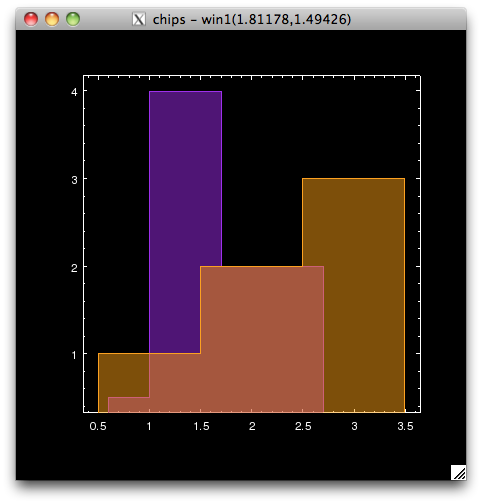
but opening the PDF in Preview shows:
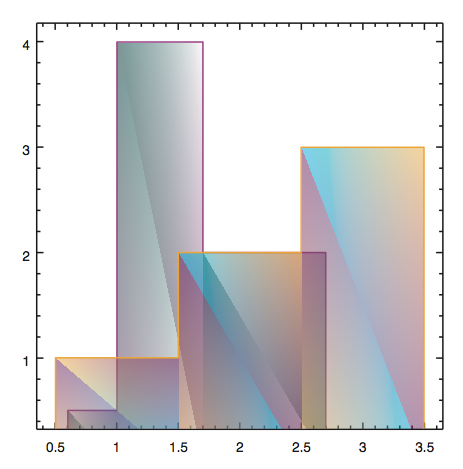
Opening the file in Acrobat displays the expected result (same as the on-screen visualization).
Error messages of the format: chipsServer[14686] <Error>: kCGErrorIllegalArgument:
The second, and subsequent, print_window calls from an interactive Python session (e.g. ChIPS or Sherpa) on an OS-X machine will result in the following messages printed to the screen:
Thu Dec 15 14:06:30 luggnagg chipsServer[14686] <Error>: kCGErrorIllegalArgument: CGSGetWindowBounds
Thu Dec 15 14:06:30 luggnagg chipsServer[14686] <Error>: kCGErrorFailure: Set a breakpoint @ CGErrorBreakpoint() to catch errors as they are logged.
Thu Dec 15 14:06:30 luggnagg chipsServer[14686] <Error>: kCGErrorIllegalArgument: CGSGetSurfaceBounds
Thu Dec 15 14:06:30 luggnagg chipsServer[14686] <Error>: kCGErrorIllegalArgument: CGSBindSurface: Invalid window 0x13d2
Thu Dec 15 14:06:30 luggnagg chipsServer[14686] <Error>: kCGErrorIllegalArgument: CGSBindSurface: Invalid window 0x13d2
Thu Dec 15 14:06:30 luggnagg chipsServer[14686] <Error>: kCGErrorIllegalArgument: CGSBindSurface: Invalid window 0x13d2
Thu Dec 15 14:06:30 luggnagg chipsServer[14686] <Error>: unknown error code: invalid drawable
error: xp_attach_gl_context returned: 2
Thu Dec 15 14:06:30 luggnagg chipsServer[14686] <Error>: kCGErrorIllegalArgument: CGSGetWindowBounds
Thu Dec 15 14:06:30 luggnagg chipsServer[14686] <Error>: kCGErrorIllegalArgument: CGSGetSurfaceBounds
Thu Dec 15 14:06:30 luggnagg chipsServer[14686] <Error>: kCGErrorIllegalArgument: CGSBindSurface: Invalid window 0x13d2
Thu Dec 15 14:06:30 luggnagg chipsServer[14686] <Error>: kCGErrorIllegalArgument: CGSBindSurface: Invalid window 0x13d2
Thu Dec 15 14:06:30 luggnagg chipsServer[14686] <Error>: kCGErrorIllegalArgument: CGSBindSurface: Invalid window 0x13d2
Thu Dec 15 14:06:30 luggnagg chipsServer[14686] <Error>: unknown error code: invalid drawable
error: xp_attach_gl_context returned: 2
Whilst distracting, they can be ignored.
Calling print_window when in non-interactive mode will cause a message like path: 440_0xe00001
E.g. when the window.display setting is False.
The message can be ignored.